 Agencies
 E-com brands
 Coaches and creators
 Scrape
 Brands
 Radar
Radar Hooks
Hooks Scripts
 History
Google Ads Transparency Center: How to See Any Advertiser's Google and YouTube Ads

By Daniel, founder of Adlicio · Oct 26, 2026 · 9 min read
On this page
- What the Ads Transparency Center includes
- How to search the Google Ads Transparency Center, step by step
- What the results show
- Regional differences: what you see in Europe
- What the Ads Transparency Center does not show
- Export and data access
- How to track an ad over time
- Tips for competitor research on Google
- Where Adlicio fits
- FAQ
Short answer: the Google Ads Transparency Center at adstransparency.google.com is Google's ads library. Type an advertiser's name or website, pick it from the list, set the region, and you see the ads Google served for them in the past year on Search, YouTube, Shopping, Maps and Play. You can filter by date, platform and format. It is free and needs no account, except for age-restricted ads. For ads shown in Europe and Türkiye, Google adds the date the ad was first shown, a range of how many times it was shown, a topic label and the audience criteria. Spend, clicks and keywords are never shown.
How we checked: the facts below come from the Transparency Center itself and its FAQ, read on October 26, 2026. The screenshots are from real searches for Nike in the United States and Germany on October 26, 2026. Adlicio publishes this guide and has no Google ad search of its own.
What the Ads Transparency Center includes
Google's FAQ sets the scope:
- ✓Verified advertisers, worldwide: ads "served across Search, Play, Maps, Shopping, and YouTube for one year from the date the ad was last displayed."
- ✓Every advertiser in Europe and Türkiye: unverified advertisers are included there too. Google's "Europe" means the European Economic Area: the EU plus Iceland, Liechtenstein and Norway.
- ✓Election ads: kept for up to seven years after they last ran, in regions where Google allows political ads. The Political ads tab at the top of the page switches to them.
- ✓Who is named: the advertiser, not the agency that made the ad. If someone else paid, the payer's name is shown too.
- ✓Delay: information about an ad can take 48 to 72 hours to appear after it is shown.
Google launched the current version in March 2023 and described it as "a searchable hub of all ads served from verified advertisers" in its announcement.
How to search the Google Ads Transparency Center, step by step
- ✓Open adstransparency.google.com. Leave "All topics" selected unless you want election ads.
- ✓Type the advertiser or the website in the search box. The dropdown splits into two lists. "Advertisers" shows each matching account with the country it is based in and an approximate ad count, for example Nike, Inc., United States, about 9,000 ads. "Websites" lists domains such as nike.com.
- ✓Choose between the advertiser and the website. An advertiser result shows one account's ads (or a group of accounts with similar names, which Google flags on the page). A website result shows ads from any advertiser that points to that domain, which catches regional accounts and resellers.
- ✓Set the region with the "Ads in" menu on the right. Ads differ by country, and big brands often use a different account per region. In Germany, Nike's ads came from accounts such as Nike Retail BV, while the US account Nike, Inc. had no video ads shown there.
- ✓Filter the results. Date offers Any time, Today, Yesterday, Last 7 days, Last 30 days and Custom. Platform offers Google Maps, Google Play, Google Shopping, Google Search and YouTube. Format offers Image, Text and Video.
- ✓Click any ad to open its detail page.
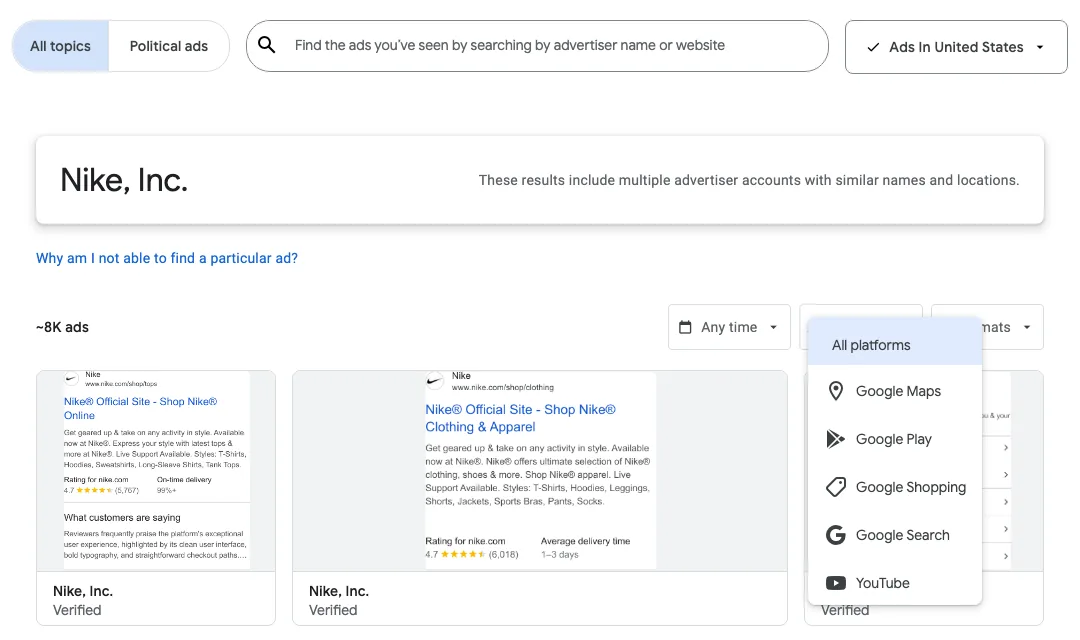 Nike, Inc. in the United States: about 8K ads, with the platform filter open. Screenshot: October 26, 2026.
You can also start from an ad you saw. Google says you can reach the Transparency Center "by visiting My Ad Center through the three-dot menu next to the ads you see."
One limit on the platform filter: the page warns that it only works for ads shown since September 4, 2023. Older ads drop out of the results as soon as you pick a platform.
What the results show
The results grid shows a preview of each ad with the advertiser name and a "Verified" label. The advertiser page adds the legal name, the country the advertiser is based in and the line "Advertiser has verified their identity".
The detail page for an ad shown in the United States is short: the last date it was shown, the format, and up to five variations to click through. Google's FAQ says the Center "shows up to 5 common variations of an ad", so an advertiser testing many headlines will have versions you can't see.
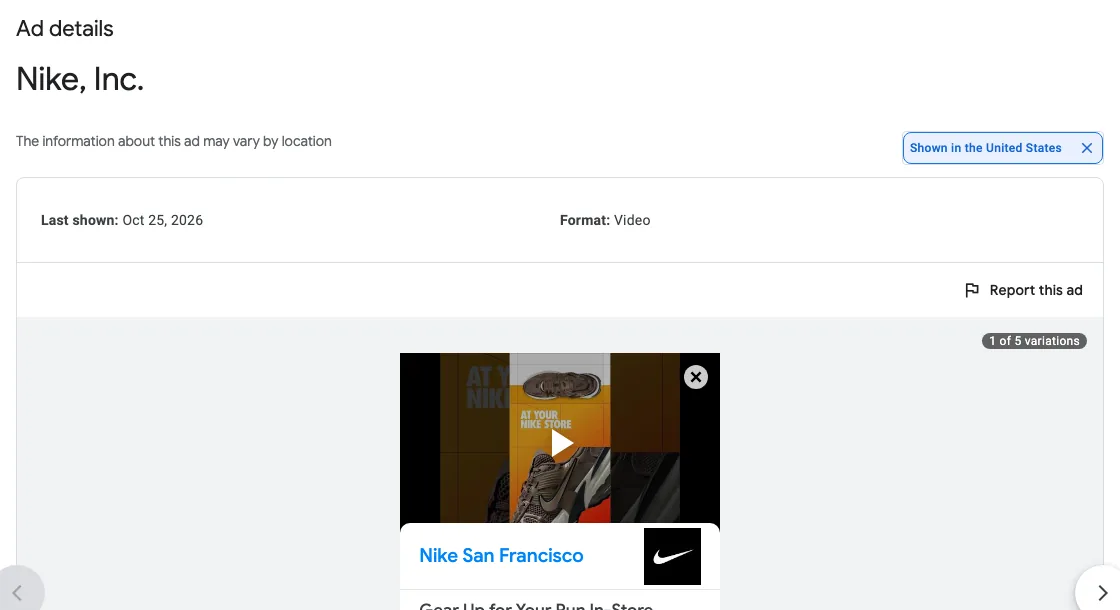 A Nike video ad shown in the United States: last shown date, format and variations. Screenshot: October 26, 2026.
Regional differences: what you see in Europe
For ads shown in Europe and Türkiye, and for political ads, Google shows extra information. Switch the region to an EEA country and the same kind of ad page gains four things:
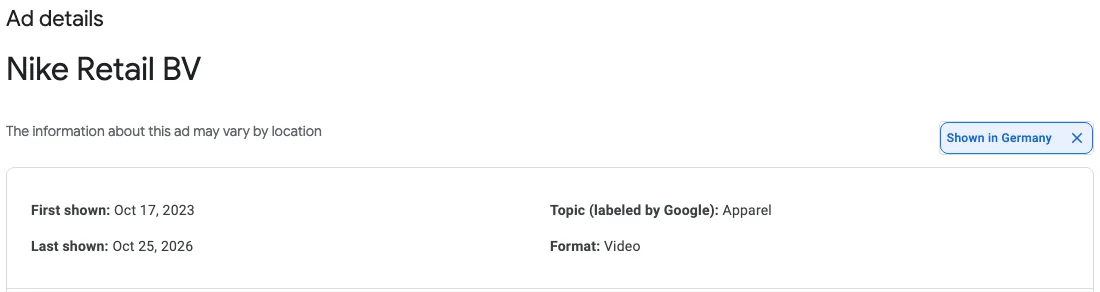 The same kind of ad shown in Germany: first shown, last shown, a topic label and the format. Screenshot: October 26, 2026.
- ✓First shown. This Nike Retail BV video ad was first shown on October 17, 2023 and last shown on October 25, 2026, so it ran for three years.
- ✓Topic (labeled by Google). Here, "Apparel".
- ✓Times shown. A range, here 1M to 1.25M, for a stated period. Google started tracking this on March 1, 2023 and publishes it after a 90-day delay, which is why the range ends on July 27, 2026.
- ✓Audience selection. Whether the advertiser included or excluded people by demographic info, geographic locations, contextual signals and other categories.
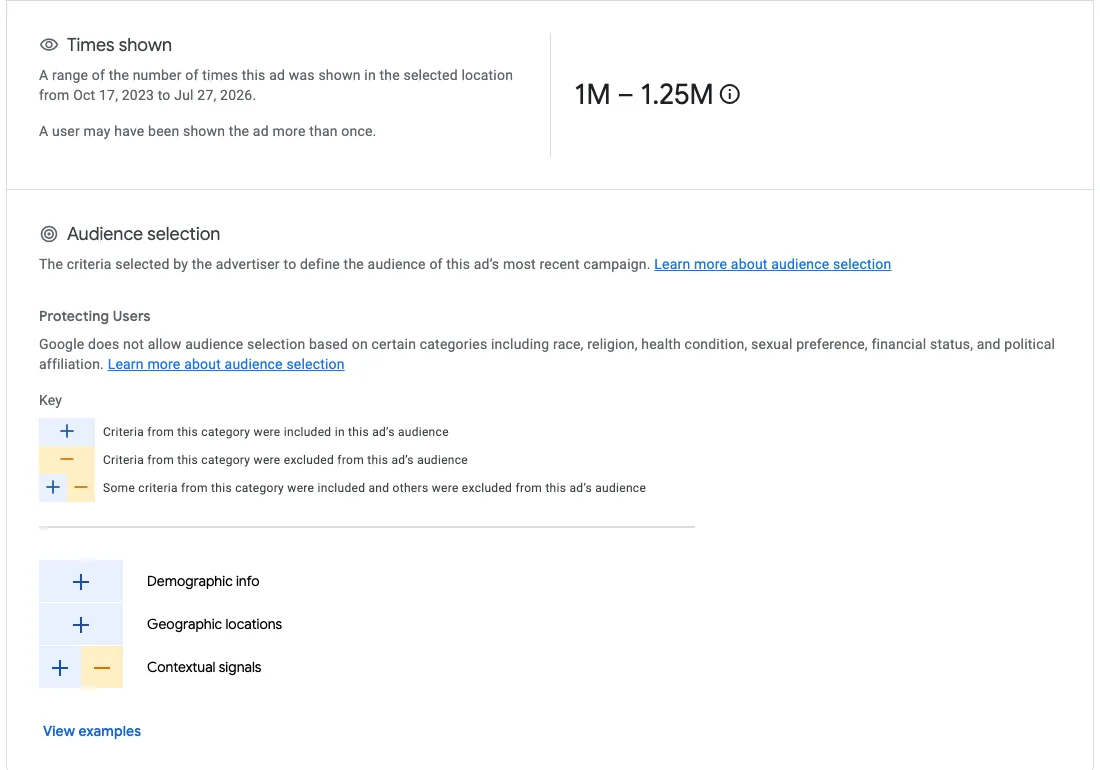 Times shown (1M to 1.25M) and the audience selection categories for the same ad. Screenshot: October 26, 2026.
Where Google has the data, an information icon next to the times-shown range opens a breakdown by Google Maps, Google Play, Google Search, Google Shopping and YouTube, counted since September 4, 2023.
| What you see | United States and most countries | Europe (EEA) and Türkiye |
|---|---|---|
| Ad creative and up to 5 variations | Yes | Yes |
| Last shown date | Yes | Yes |
| First shown date | No | Yes |
| Times shown (a range) | No | Yes, after 90 days |
| Topic label | No | Yes |
| Audience selection | No | Yes |
| Unverified advertisers | Not included | Included |
If your competitor advertises in Europe at all, check them with an EEA country selected. The first-shown date is the best run-time signal Google offers.
What the Ads Transparency Center does not show
- ✓Spend, clicks, click-through rate or conversions. None of these appear for normal ads.
- ✓Keywords. Google lists no keywords, bids or match types, so you can see a search ad's text but not what triggered it.
- ✓Landing pages. You can't click through. Google's FAQ says it is moving to static screenshots of ads and that the change is permanent.
- ✓Impressions outside Europe and Türkiye. US ads show only the last shown date.
- ✓Every variation. Up to five common variations per ad.
- ✓Advertisers that haven't verified, outside Europe and Türkiye, and anyone with no ads served in the last 365 days.
- ✓Ads in real time. Expect a 48 to 72 hour delay.
- ✓Age-restricted ads, unless you sign in to a Google account that meets the age limit.
Dates are in Pacific Time, so a "Today" filter can look off by a day if you are in Europe.
Export and data access
The web interface has no download button that we could find. For ads shown in Europe, the Center's own notice offers "API access to this data" and links to a BigQuery public dataset in Google Cloud, and Google's ads transparency policy page confirms API access to data about ads served in the EEA. That suits analysts. For everyday competitor research, a screenshot and a spreadsheet row per ad is enough.
How to track an ad over time
- ✓Bookmark filtered views. The page address keeps the region, platform and format, for example
?region=US&platform=YOUTUBE&format=VIDEOafter an advertiser link. Reopen it each month. - ✓Log the creative ID. Each ad page address ends in an ID that starts with "CR". Keep it in a sheet with the date you first saw the ad and its last shown date.
- ✓Use Last 30 days to see what is live. Ads that keep appearing in a 30-day window month after month are still running.
- ✓In Europe, read the dates directly. First shown and last shown give you the run time without guessing.
Tips for competitor research on Google
See their YouTube ads. Set Platform to YouTube and Format to Video. For one Nike, Inc. account in the United States that gave about 200 video ads. Searches for a "YouTube ad library" end up here: we found no separate YouTube ad library from Google.
Read search ads for offers. Text ads are short, so the claims, prices and guarantees stand out. Write down which ones a competitor repeats across many ads.
Check Shopping and Maps. Shopping shows which products a competitor pushes. Maps ads show which locations they promote.
Use run time as a signal. An ad that has run for months is one the advertiser keeps paying for. In Europe you can see this directly. In the United States, watch whether an ad keeps showing a recent "last shown" date month after month.
Search the website too. A domain search catches ads from regional accounts and partners that an advertiser search misses.
Where Adlicio fits
Adlicio does not search the Google Ads Transparency Center. It works on what buyers say about the product in the ad. When a competitor's YouTube ad is also a public video, Adlicio's free YouTube Comment Viewer shows what viewers wrote under it, and the YouTube transcript tool gives you the script. On a paid plan, Adlicio groups a competitor's Amazon, Trustpilot or G2 reviews into complaints with quotes.
For Facebook and Instagram, Adlicio's free Meta Ad Library Search lists a brand's active Meta ads sorted by how long each has run, and on the Growth plan and up you can pull competitor Meta ads into Claude or ChatGPT through the Meta Ad Library connector. Other platforms are covered in how to see competitor ads.
FAQ
Is there a Google Ads library? Yes. Google's ads library is the Ads Transparency Center at adstransparency.google.com. It covers Search, YouTube, Shopping, Maps and Play.
Is the Google Ads Transparency Center free? Yes, and you don't need an account. Google asks you to sign in only to see age-restricted ads.
How far back does it go? One year from the date an ad was last shown. Election ads stay for up to seven years.
Why can't I find a competitor? Google's FAQ gives two reasons: the advertiser has not completed verification, or they have had no ads served in the last 365 days. Also check the region and try a website search.
Can I see a competitor's keywords or ad spend? No. The Center shows ads, dates and, in Europe, ranges of times shown. It shows no keywords, bids or spend for normal ads.
Can I see YouTube ads? Yes. Set the Platform filter to YouTube, and Format to Video for video ads.
How long until a new ad appears? Usually 48 to 72 hours after it is shown.
Can I click through to the landing page? No. Google says click-through is removed for good.

About the author
Daniel is the founder of Adlicio. He builds the scrapers behind it and uses them daily to turn customer comments and reviews into ad angles.