 Agencies
 E-com brands
 Coaches and creators
 Scrape
 Brands
 Radar
Radar Hooks
Hooks Scripts
 History
LinkedIn Ad Library: How to See Any Company's Ads (2026)

By Daniel, founder of Adlicio · Oct 26, 2026 · 9 min read
On this page
- What the LinkedIn Ad Library includes
- How to search the LinkedIn Ad Library, step by step
- What the results show
- Why some ads show dates and impressions and others don't
- What the LinkedIn Ad Library does not show
- How to track a competitor's LinkedIn ads over time
- Tips for competitor research on LinkedIn
- Where Adlicio fits
- FAQ
Short answer: go to linkedin.com/ad-library, type a company into "Company or advertiser" and press Search. It is free and works without a LinkedIn account. You get the company's ads, newest first: LinkedIn keeps each ad for a year after its last impression, going back to June 1, 2023. "View details" opens the full ad. For ads targeted to the EU, LinkedIn also shows the dates the ad ran, a range of impressions, impressions by country and the main targeting. For every other ad you see the creative, the format, the advertiser and who paid. Spend, clicks and leads are never shown.
People search for it as the LinkedIn Ads Library too. It is the same tool.
How we checked: everything below was read on LinkedIn's own Ad Library and help pages on October 26, 2026, and the screenshots come from real searches for HubSpot on October 25 and 26, 2026. Adlicio publishes this guide. Adlicio has no LinkedIn ad search of its own, and the section near the end says what it does instead.
What the LinkedIn Ad Library includes
LinkedIn's FAQ on the Ad Library page answers the basics:
- ✓Which ads: ads that have run on LinkedIn. You can search ads created on or after June 1, 2023.
- ✓How long they stay: one year after the ad's last impression.
- ✓When new ads appear: "shortly after it receives its first impression."
- ✓Account: "Anyone can explore the Ad Library, with or without a LinkedIn account."
- ✓Opt-outs: advertisers cannot keep their ads out of it.
- ✓Dates: all dates are in UTC. The start date is the first impression and the end date is the last impression.
Two related searches sit next to it. Brand partnership search finds organic posts that creators labeled as brand partnerships (these are member posts, not ads), and the Job Library holds paid job posts.
How to search the LinkedIn Ad Library, step by step
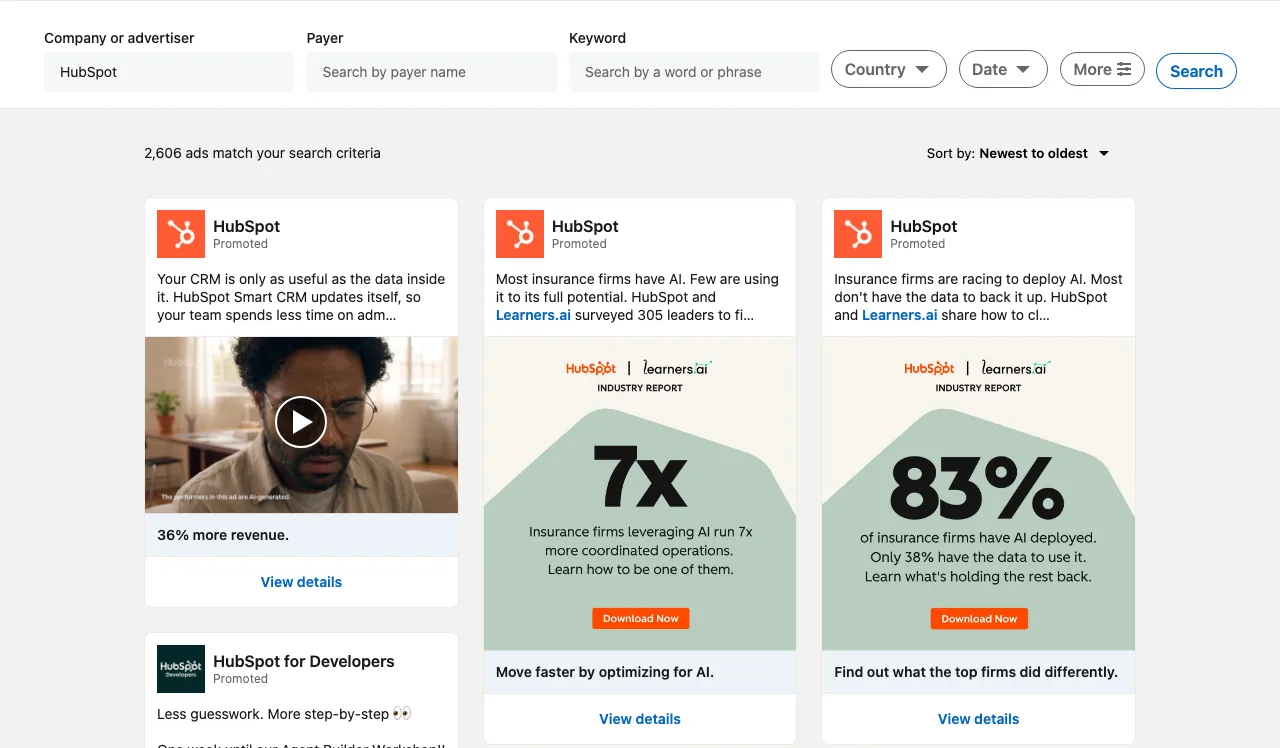 A search for HubSpot in the LinkedIn Ad Library: 2,606 ads, newest first. Screenshot: October 25, 2026.
- ✓Open the library at linkedin.com/ad-library. No sign-in prompt appears.
- ✓Type the company into "Company or advertiser". Our HubSpot search returned 2,606 ads, including ads from "HubSpot for Developers", so check the advertiser name on each card when a brand runs several pages.
- ✓Use Payer when names differ. Payer searches the "Paid for by" name on each ad. Use it when the name on an ad is a person or a sub-brand and you want everything one company pays for.
- ✓Or search a keyword. "Keyword" matches a word or phrase in the ads, so a category word such as "CRM" shows who advertises in your space, including companies you did not know about.
- ✓Pick countries. The Country filter takes one or more countries. HubSpot had 344 ads with Germany selected, against 2,606 with no country set.
- ✓Set a date range. The Date filter offers Last 30 days, This month, This year, Last year, or a custom range.
- ✓Open "More" for EU filters. It holds an impressions range and eight targeting filters: Language, Location, Audience, Demographic, Company, Education, Job, and Interests and Traits. Each can be set to inclusions, exclusions or both. LinkedIn notes that the impressions filter "will only show ads from EU region."
- ✓Sort by "Newest to oldest" (the default) or "Oldest to newest".
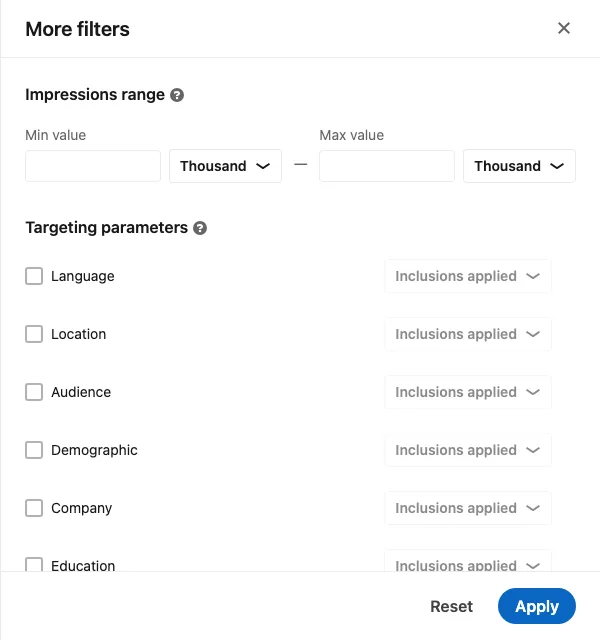 The More filters panel: impressions range and targeting filters, which only match EU ads. Screenshot: October 25, 2026.
The whole search lives in the page address, for example linkedin.com/ad-library/search?accountOwner=HubSpot&countries=DE. Bookmark it and you can rerun the same search next month in one click.
What the results show
Each card shows the advertiser, the start of the intro text, the creative (an image, a video with a play button, or a document) and the headline. "View details" opens the ad page, which has the full intro text, the creative, the call-to-action button and a panel called "About the ad".
For an ad that was not targeted to the EU, that panel is short. HubSpot's US video ad showed three lines: "Video Ad", "Advertiser HubSpot" and "Paid for by HubSpot, Inc.". Every ad page also carries LinkedIn's note that the ad "may have multiple versions", but only one version is shown.
For an ad targeted to the EU, the panel adds a lot:
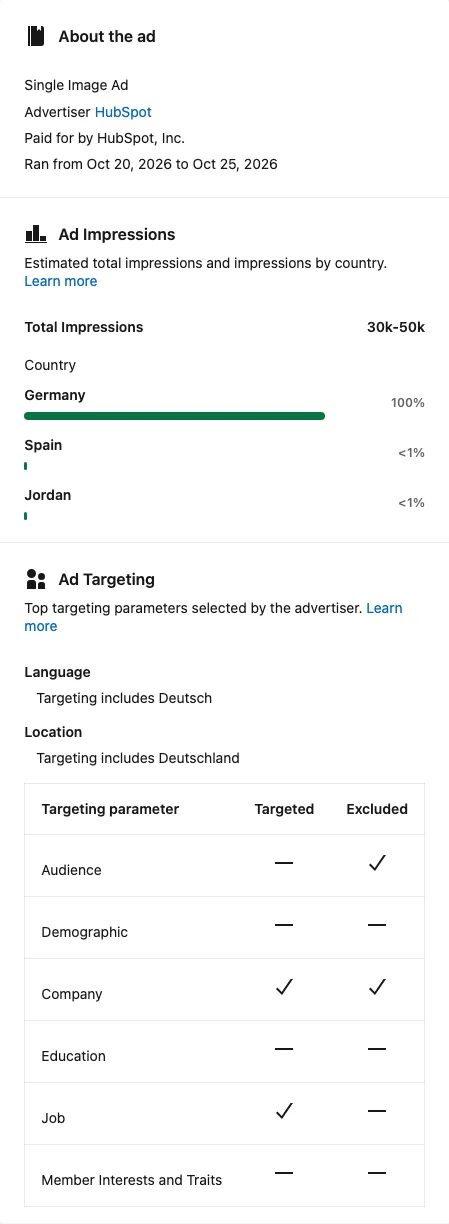 A HubSpot ad targeted to Germany: run dates, a 30k to 50k impressions range, impressions by country and the targeting used. Screenshot: October 26, 2026.
- ✓Run dates: "Ran from Oct 20, 2026 to Oct 25, 2026".
- ✓Total impressions: a range, here 30k-50k.
- ✓Impressions by country: Germany 100%, with Spain and Jordan under 1%. LinkedIn's help page on targeting and impressions says these shares are rounded to the nearest percent, and that impressions can land in countries that were not targeted because members travel or have old profile locations.
- ✓Targeting: the language and location the advertiser targeted (German, Germany), plus a table that marks whether Audience, Demographic, Company, Education, Job and Member Interests and Traits criteria were used to include or exclude people.
Why some ads show dates and impressions and others don't
LinkedIn's FAQ says it shows "basic information" for all ads (advertiser, format and creative) and adds impressions, targeting and run dates "for ads targeted to the EU". So the same company can have ads with full data and ads with almost none.
This changes how you search. If your competitor also targets Europe, run your search with an EU country selected, such as Germany, France or the Netherlands. You will see their EU campaigns with dates and impressions. A competitor that only advertises in the US will show creatives and formats, with no dates.
What the LinkedIn Ad Library does not show
- ✓Spend, clicks, leads or click-through rate. LinkedIn does not list any of them among the information shown.
- ✓Exact impressions. You get a range, and only for EU-targeted ads.
- ✓Run dates for ads outside the EU. For those you have to note the date you first saw an ad yourself.
- ✓Every version of an ad. One version is shown, with a note that others may exist.
- ✓Older ads. Nothing created before June 1, 2023, and nothing more than a year after its last impression.
- ✓Organic posts. Company page posts are not ads. Creator partnerships are in the separate brand partnership search.
- ✓An export. We found no download, save or alert option in the library on October 26, 2026. Copy what you need as you go.
How to track a competitor's LinkedIn ads over time
- ✓Save one search per competitor as a bookmark, with the country you care about.
- ✓Once a month, set Date to "Last 30 days" and rerun it. Ads that show up month after month are still being paid for.
- ✓Log each ad by its ID. The number at the end of a detail page address (
/ad-library/detail/1585176223) is the ad's ID. Keep a sheet with the ID, the date you first saw it, the format, the offer and the hook. - ✓For EU-targeted ads, copy the "Ran from" dates. They give you the real run time without any guessing.
- ✓Save the creative yourself. An ad drops out a year after its last impression, and LinkedIn offers no saved lists.
Tips for competitor research on LinkedIn
Treat run time as a signal. An ad that keeps running is one the advertiser keeps paying for. That is a hint about what works for them. It does not prove the ad made money, so compare run times inside one advertiser's ads instead of across companies with very different budgets.
Read the impressions range as budget. A range of 30k-50k over five days in one country tells you roughly how hard they are pushing that message. It says nothing about results.
Group ads by offer. In our HubSpot searches, the ads fell into a few clear offers: an industry report made with Learners.ai, a live demo for teams thinking about switching ("Zeit für ein neues Marketingsystem?"), a self-updating CRM, and an AI agent workshop for developers. Listing the offers this way shows you where a competitor is spending attention.
Check who they target. On EU ads, the targeting table shows whether a company filters by job, company or audience lists. HubSpot's German demo ad used job and company criteria to include people, and excluded some audiences and companies.
Search the category, not only the brand. A keyword search with your country selected shows every advertiser using that word, which is the fastest way to find competitors you did not know were advertising.
Where Adlicio fits
Adlicio does not search the LinkedIn Ad Library. It covers the other half of competitor research: what buyers say about the product being advertised. The free LinkedIn Viewer shows the comments on a competitor's public LinkedIn posts without logging in, and on a paid plan Adlicio pulls a competitor's G2 or Trustpilot reviews and groups the complaints with quotes. See how to analyze competitor reviews.
If the same competitor also advertises on Facebook and Instagram, Adlicio's free Meta Ad Library Search lists their active Meta ads sorted by how long each has run, and on the Growth plan and up you can ask Claude or ChatGPT for their Meta ads through the Meta Ad Library connector. For every other platform, see how to see competitor ads.
FAQ
Is the LinkedIn Ad Library free? Yes. Anyone can search it, with or without a LinkedIn account.
How far back does the LinkedIn Ad Library go? You can search ads created on or after June 1, 2023. Each ad stays for one year after its last impression.
Can I see how much a company spends on LinkedIn ads? No. The closest signal is the impressions range, which LinkedIn shows only for ads targeted to the EU.
Why do some LinkedIn ads show impressions and targeting? LinkedIn adds impressions, targeting and run dates for ads targeted to the EU. Other ads show the creative, format, advertiser and payer.
How do I find ads by a company that uses several pages? Search by Payer instead of Company or advertiser, or search the company name and check the advertiser on each card.
How soon does a new ad appear? LinkedIn says an ad typically appears shortly after its first impression.
Can I download ads from the LinkedIn Ad Library? There is no export. Note the ad ID from the page address and keep your own copy of the creative.
Can a company hide its ads from the library? No. LinkedIn says advertisers cannot opt out.

About the author
Daniel is the founder of Adlicio. He builds the scrapers behind it and uses them daily to turn customer comments and reviews into ad angles.