 Scrape
 Brands
 Radar
Radar Hooks
Hooks Scripts
 History
How to scrape TripAdvisor reviews
By Daniel, founder of Adlicio · 3 min read
Quick answer
TripAdvisor's Content API is partner-only and returns a few recent reviews. See the routes that work and read a listing in about 60 seconds.
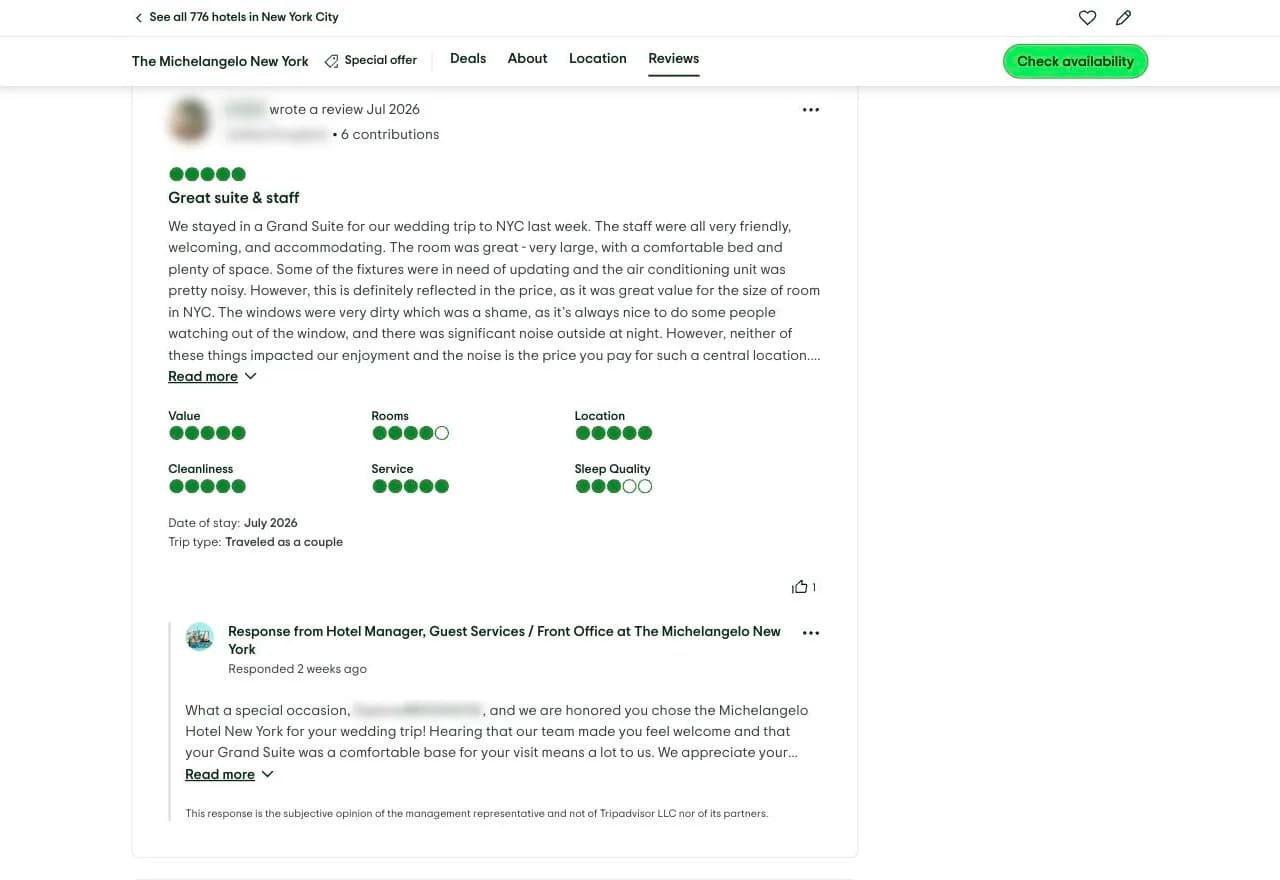
TripAdvisor reviews are worth the effort because they are long. People recount the whole trip, the anticipation, the let-down, the small detail that made it perfect, so the language is unusually rich in expectation-versus-reality material. The problem is getting at it. TripAdvisor's official Content API is partner-oriented, built for approved travel businesses to display their own ratings, and it returns only a handful of recent reviews per property, not the full history.
So the practical question is how to read the reviews TripAdvisor shows any visitor. Here are the routes, from manual copying to reading the public listing through your own browser, and the fastest path to usable customer language.
★ 4.6 on the Chrome Web Store · no card needed
Manual copying: the reviews are long, so this is slow
You can open a listing and copy reviews by hand, but TripAdvisor's strength works against you here: the reviews are paragraphs long, so copying enough of them to see a pattern takes real time. Reviews paginate, filters hide some, and the narrative you need, the moment a guest's expectation met or missed reality, is scattered across dozens of long entries. You will read a few and miss the recurring theme.
The Content API: partner-only, a few recent reviews
TripAdvisor's Content API requires a partner agreement and is aimed at businesses displaying their own property data. It returns location details, ratings, and only a small set of the most recent reviews, not the deep back catalogue where the patterns live. There is no official route to the full review history for a property you do not represent, and scraping the site directly runs into dynamic loading and anti-bot friction. For research at any depth, the API is not the answer.
The paste-a-URL route
Adlicio reads the reviews on a public TripAdvisor listing through your own browser session, the same content any visitor sees, with no API key or partner status. Give it the listing and it captures the long-form reviews in about 60 seconds.
Then it ranks them into angles: the recurring drivers of a five-star experience, the disappointments that sink a rating, and the exact expectations guests carry in, each backed by verbatim quotes. That expectation-versus-reality language is ideal for hospitality ad angles, and any brand selling on emotion can mine the same narrative depth.
The 60-second version
- 01Pick the listings your guests weigh
A competing property, the category leader in your area, and your own. Two-star reviews often reveal the expectation your copy has to manage.
- 02Paste each listing into Adlicio
The scrape reads the public reviews and finishes in about 60 seconds per listing.
- 03Mine the arc, keep the quotes
The output ranks recurring drivers and disappointments into angles with hook lines. A repeated expectation becomes your promise, the verbatim quote becomes your proof line.
Questions people also ask
Why can't I get all reviews from the TripAdvisor API?+
The Content API is partner-oriented and built for businesses to show their own property data, so it returns only a handful of recent reviews. There is no official endpoint for the full review history, which is why deeper research reads the public listing instead.
Do I need to be a TripAdvisor partner to research reviews?+
No. Adlicio reads the publicly visible reviews through your own browser session, so there is no partner agreement or API approval involved. It captures what any visitor to the listing can see.
What makes long-form travel reviews good for ads?+
Because guests describe the whole experience, the reviews are dense with expectation-versus-reality language: what they hoped for, what they got, and the gap between. That arc is the emotional spine of a hospitality ad angle.
Can I export the TripAdvisor reviews I collect?+
Yes. Every scrape lands in your history with a CSV export, so you can filter the raw reviews alongside the ranked angles.
About the author
Daniel is the founder of Adlicio. He builds the scrapers behind it and uses them daily to turn customer comments and reviews into ad angles.
More guides
TripAdvisor scraperAll scrapersSee pricing
Run this play on your own TripAdvisor page.
Paste one public URL. Adlicio returns the angle, hook, and proof to test next.